
aWallet Cloud Password Manager: Detailed Review and Download Guide
Screenshots



Introduction
aWallet Cloud Password Manager is a robust application developed by Synpet, designed to securely store your sensitive information such as passwords, credit card details, e-banking credentials, and web accounts. The application stands out in the crowded field of password management tools by offering seamless synchronization of encrypted data with your own cloud account, be it Dropbox or Google Drive. With version 11.1.0, aWallet aims to provide a user-friendly experience while prioritizing your data security. The app is ad-free and comes packed with features that enhance both usability and safety.
Graphics & Gameplay
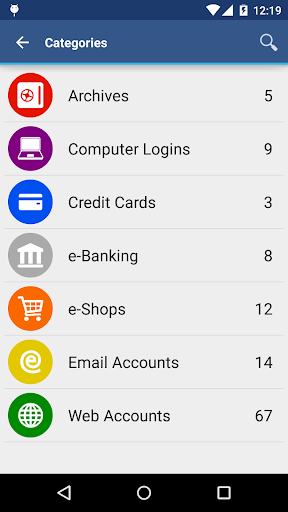
The visual design of aWallet Cloud Password Manager is both functional and aesthetically pleasing. The screenshots depict a clean, intuitive user interface, making it easy for users to navigate through various options. Users will notice a well-organized layout featuring categorized data entries, which makes searching for specific information a breeze. The application provides custom icons for different data categories, allowing for a personalized touch. The color scheme is simple yet elegant, focusing on usability without overwhelming the user with unnecessary graphics. Overall, the interface is designed to ensure that users can manage their sensitive data with ease and confidence.
Key Features
- Secure Data Storage: aWallet securely stores your passwords, credit card information, and other sensitive data using advanced encryption algorithms.
- Cloud Synchronization: Synchronize your encrypted data with your personal cloud accounts, including Dropbox and Google Drive, ensuring you have access to your information from anywhere.
- Customizable Categories: The built-in Editor allows users to create or modify data categories with custom icons, making organization simple and intuitive.
- Search Functionality: Easily search within fields to locate specific entries quickly.
- Backup and Restore: Backup your encrypted data file to your Android USB device and restore it whenever necessary.
- Data Export: Users can export unencrypted data in CSV format directly to the USB device for easy sharing or storage.
- Auto Lock Feature: Preconfigure the auto lock feature for added security, ensuring your data is safe when not in use.
- Pro Features: Unlock your app using fingerprint or face recognition on compatible devices, generate strong passwords, and import CSV files seamlessly.
- Advanced Security Measures: aWallet employs AES or Blowfish encryption methods, uses a randomly generated 'salt,' and features repeated hashing to thwart brute force attacks.
- Data Destruction: The app can auto-destroy the data file after a specified number of unsuccessful unlock attempts, providing an extra layer of protection.
Mod Features
- Premium Unlocked: Enjoy all premium features without any restrictions, including advanced security options and enhanced customization capabilities.
- No Ads: Experience an uninterrupted user experience with no advertisements, allowing for seamless navigation and focus on managing your passwords.
- Unlimited Cloud Sync: Sync as much data as you need with your cloud accounts without worrying about limits, making it perfect for users with extensive data.
- Enhanced Encryption Options: Access additional encryption options beyond the standard features, allowing for even more customization based on your security needs.
- Custom Themes: Unlock a variety of themes and color palettes for a personalized aesthetic while using the app.
How to Install APK on Android
Installing the aWallet Cloud Password Manager APK is a straightforward process. Follow the steps below to get started:
- Download the APK: Click on the provided link to download the aWallet Cloud Password Manager APK file directly onto your Android device.
- Enable Unknown Sources: Go to your device's Settings, navigate to Security, and enable 'Install from Unknown Sources' to allow the installation of apps from sources other than the Google Play Store.
- Locate the APK File: Use a file manager app to navigate to the folder where the APK was downloaded (usually the 'Downloads' folder).
- Install the App: Tap on the APK file. A prompt will appear asking for your permission to install the application. Confirm the installation.
- Open the App: Once installed, you can find aWallet Cloud Password Manager in your app drawer. Tap to open and start setting up your password management.
Conclusion
aWallet Cloud Password Manager is an excellent tool for anyone looking to manage their sensitive information securely. With its user-friendly interface, robust encryption, and diverse features, it stands out as a top choice among password management applications. Whether you’re a casual user or someone with extensive data management needs, aWallet offers the security and functionality you require.
Ready to enhance your password management? Download the aWallet Cloud Password Manager now! Click here to download the APK and secure your sensitive information today!